Webhook 是一种订阅网站或服务的方法,您控制的网站或服务可以通过 HTTP 接收到此订阅数据。这允许平台与应用系统之间集成和交互,但同时保持平台独立性。它扩展了 Web API 的能力,以提供平台与系统之间双向通信。
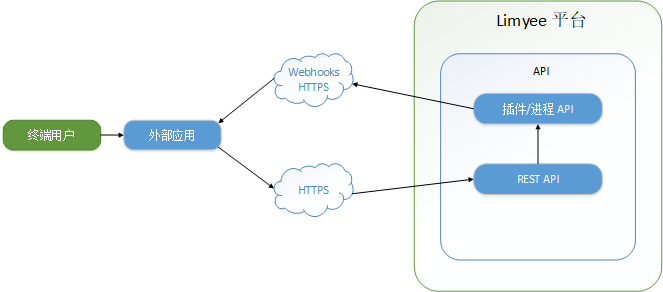
在收到 Webhook 数据后,与 Limyee 电商平台的任何后续交互都将通过 REST 完成。
Webhook 补充了 Limyee 电商平台 REST API,允许外部应用程序在 Limyee 电商平台在发生事件时响应这些事件。REST API 提供的功能支持主动代码(基于某些外部操作),而 Webhook 提供了执行反应式代码(响应某些内部事件)的方法。
以下情况应该使用 Webhook:
当 Limyee 电商平台发生某些事件时,如果订阅了webhook,则 HTTP POST 数据将发送到 Webhook 的配置URL。为了能接收 Limyee 电商平台 Webhook 的负载,您需要在服务器上设置为接受 Webhook 端点的 HTTP POST 。由于数据是通过 HTTP 的 JSON,因此可以使用任何语言来接收数据并对其执行操作。
对于此示例,我们使用 ASP.NET MVC 项目作为框架,但我们也可以使用 HttpHandler 或任何处理 HTTP 请求内容的框架。这也可以使用 .NET 以外的技术(Java,PHP等)来完成。对于替代技术,您只需要有能够响应来自平台 HTTP POST 的组件。
由于 Webhook 通过 HTTP 请求运行,因此您的外部服务需要一种方法来验证发布的信息是否真正来自您的 Limyee 电商平台。为此,在创建时,会为每个 Webhook 分配预先生成的密钥。此密钥用于构建每个有效负载的 POST 数据的哈希签名。您可以通过使用密钥对 POST 数据进行哈希处理并检查签名是否匹配,来验证 HTTP 请求的发送者是否来自 Limyee 电商平台。
对 Webhook 的已配置 URL 端点发出的 HTTP 请求将包含多个特殊标头:
|
页眉 |
描述 |
|
X-Limyee-Webhook-Sender |
发送此事件信息的站点的 URL。 |
|
X-Limyee-Webhook-Signature |
使用站点生成的密钥对负载进行 HMAC base64 哈希。 |
验证需要三件事:来自 HTTP POST 的原始数据、您存储的密钥以及与 POST 一起发送的哈希。前两个分别作为"数据"和"机密"发送到验证方法。
首先,我们使用 UTF-8 编码和密钥设置哈希方法。
private string CalculateSignature(string data, string secret)
{
    // Use UTF-8 as the encoding
    var encoding = new System.Text.UTF8Encoding();
    byte[] secretByte = encoding.GetBytes(secret);
    HMACSHA256 hmacsha256 = new HMACSHA256(secretByte);
然后,我们使用哈希函数生成原始数据的哈希。
    byte[] dataBytes = encoding.GetBytes(data);
    byte[] dataHash = hmacsha256.ComputeHash(dataBytes);
接下来,需要将哈希值转换为 base64,以检查 POST 提供的哈希值。
    // Convert byte data to readable Base64 string
    return Convert.ToBase64String(dataHash);
}
最后,我们可以将此方法的使用合并到您的处理程序中:
string senderUrl = HttpContext.Request.Headers["X-Limyee-Webhook-Sender"];
string hashSignature = HttpContext.Request.Headers["X-Limyee-Webhook-Signature"];

string rawPostData;
using (var reader = new System.IO.StreamReader(HttpContext.Request.InputStream))
{
    rawPostData = reader.ReadToEnd();
}

// Validate the posted data's authenticity
string calculatedSignature = CalculateSignature(rawPostData, SECRET_KEY);
if (!hashSignature.Equals(calculatedSignature))
    // The signatures do mot match only if the wrong secret is used,
    // or the data is not from the community site.
    return new HttpStatusCodeResult(HttpStatusCode.BadRequest);
所有 Webhook 负载都包含事件类型的标识符 (TypeId) 以及事件发生的日期 (DateOccurred)。此外,每个都包含一个子容器 (EventData),其中包含与该特定事件相关的数据。在管理>集成> Webhook 中编辑 Webhook 时,可以找到每个可用事件的完整示例数据。请注意:实际的HTTP POST 中仅包含最少数据(ids,日期)。为了检索更多信息或对这些信息执行操作,您需要发出其他 REST 请求。
示例有效负载数据:
{
  "events": [
    {
      "TypeId": "c5923f51-9fde-4e6b-9a68-4a11b916c0cc",
      "DateOccurred": "2020-03-25T15:15:57.623Z",
      "EventData": {
        "ActorUserId": 2100,
        "ContentId": "193f82f3-dcf2-4124-aac9-8612e22530a6"
      }
    },
    {
      "TypeId": "05189b47-962b-458b-9d64-2d7cfc93b4a3",
      "DateOccurred": "2020-03-25T15:15:57.710Z",
      "EventData": {
        "ActorUserId": 2100,
        "ContentId": "cb0ab3d8-5bb4-4d37-bcf2-96a7c6c8221f"
      }
    }
  ]
}
在处理程序中,我们首先需要获取 Http 标头并验证消息源,如上所述:
// Secret key will be a random length string of random letters and numbers
private const string SECRET_KEY = "v7peb71omqy9bg4fsyry8ya21j8qu0y0";

[HttpPost]
[AllowAnonymous]
[ActionName("Index")]
public ActionResult Callback()
{
    try
    {
        string senderUrl = HttpContext.Request.Headers["X-Limyee-Webhook-Sender"];
        string hashSignature = HttpContext.Request.Headers["X-Limyee-Webhook-Signature"];

        string rawPostData;
        using (var reader = new System.IO.StreamReader(HttpContext.Request.InputStream))
        {
            rawPostData = reader.ReadToEnd();
        }

        // Validate the posted data's authenticity
        string calculatedSignature = CalculateSignature(rawPostData, SECRET_KEY);
        if (!hashSignature.Equals(calculatedSignature))
            // The signatures do mot match only if the wrong secret is used,
            // or the data is not from the community site.
            return new HttpStatusCodeResult(HttpStatusCode.BadRequest);
然后,我们可以开始解析我们收到的数据并使用它执行操作:
        dynamic json = new JavaScriptSerializer().DeserializeObject(rawPostData);

        foreach (var webhookEvent in json["events"])
        {
            var typeId = webhookEvent["TypeId"].ToString();
            // Ensure that the event type is the one you want to handle
            if (typeId == "c5923f51-9fde-4e6b-9a68-4a11b916c0cc")   // Product Created
            {
                var userId = Int32.Parse(webhookEvent["EventData"]["ActorUserId"].ToString());
                var contentId = Guid.Parse(webhookEvent["EventData"]["ContentId"].ToString());

                // do something with the data
                // for instance, make a REST request using the senderUrl
            }
        }
        return null;
    }
    catch (Exception ex)
    {
        return new HttpStatusCodeResult(HttpStatusCode.Conflict, ex.ToString());
    }
}
有关发出 REST 请求的信息,请参阅 REST API 文档.
一旦你实现了你的 Webhook 处理程序,你需要通过注册它使 Limyee 电商平台发送数据。导航到“管理>集成> Webhook”以注册您的 Webhook URL。
每个 Webhook 事件类型都有一个特定的有效负载格式,其中包含相关的事件信息,可以在编辑或创建 Webhook 时查看这些信息。配置 Webhook 时,请仅选择要订阅接收数据的事件。这对于优化站点性能非常有用,因为站点仅发送你选择的重要数据,从而限制向外部服务发出 HTTP 请求的数量。
除了 url 和订阅事件的列表之外,Webhook 配置还包括 Limyee 电商平台站点在注册 Webhook 时生成的密钥。有关使用此密钥的信息,请参阅上面的“验证”部分。
最后,还有一个禁用 Webhook 的设置。您可以使用此设置暂时禁用 Webhook,而无需从站点完全删除信息。
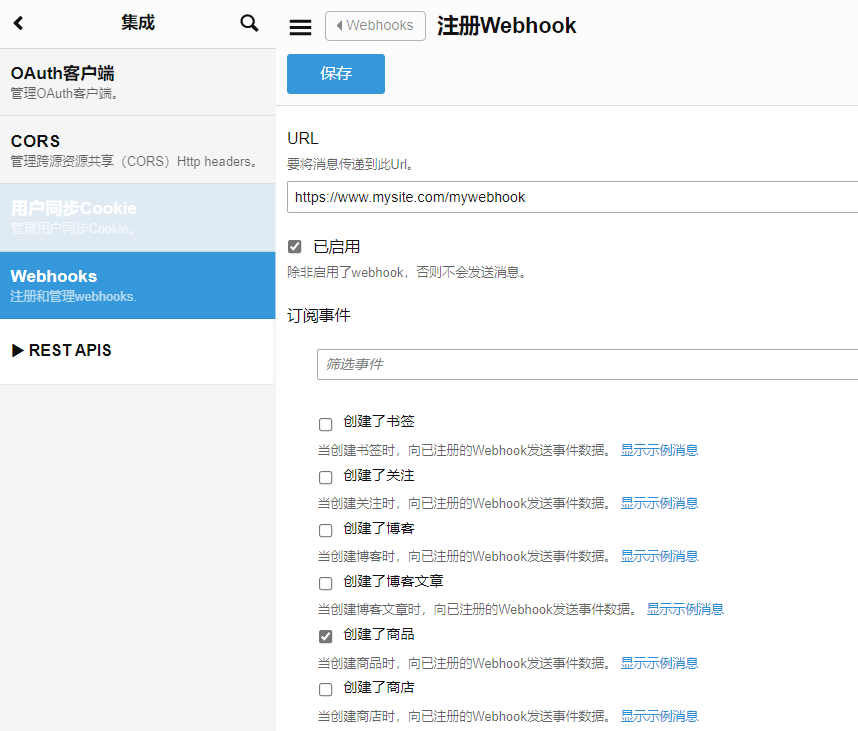
现在,您应该会收到与订阅相对应的任何新事件。
如上所述,Limyee 电商平台只会发送您订阅的事件的数据,以限制HTTP流量。站点用于限制 HTTP 流量的另一种方法是在事件发生时将事件数据收集到组中,并以指定的(短)间隔发送所有收集的数据。即使事件不会"实时"发送,您仍将始终收到按其发生顺序列出的事件,因此您可以按正确的顺序处理数据。
如果 Limyee 电商平台无法访问或 Webhook 处理程序遇到错误,它将假定未收到消息,并将标记它们以便以后重新发送。连续重试的间隔将越来越远,直到达到一定数字后,url 才会处于挂起状态。将继续为您的网址记录事件,但您需要返回并编辑您的 Webhook 以重新启用发送。此时,事件将开始发送到您的 URL。这些事件将按顺序并进行批处理,但可能需要几个批次才能赶上,因为每个 POST 的消息都有限制。这样,即使您的端点在特定时间段内不可用,您最终仍将按时间顺序接收该时间段内发生的所有事件。
using System;
using System.Net;
using System.Security.Cryptography;
using System.Web;
using System.Web.Mvc;
using System.Web.Script.Serialization;

namespace SampleWebhookHandler.Controllers
{
    public class HomeController : Controller
    {
        //
        // GET: /Home/

        public ActionResult Index()
        {
            return View();
        }

        private const string SECRET_KEY = "v7peb71omqy9bg4fsyry8ya21j8qu0y0";

        [HttpPost]
        [AllowAnonymous]
        [ActionName("Index")]
        public ActionResult Callback()
        {
            try
            {
                string senderUrl = HttpContext.Request.Headers["X-Limyee-Webhook-Sender"];
                string hashSignature = HttpContext.Request.Headers["X-Limyee-Webhook-Signature"];

                string rawPostData;
                using (var reader = new System.IO.StreamReader(HttpContext.Request.InputStream))
                {
                    rawPostData = reader.ReadToEnd();
                }

                // Validate the posted data's authenticity
                string calculatedSignature = CalculateSignature(rawPostData, SECRET_KEY);
                if (!hashSignature.Equals(calculatedSignature))
                    // The signatures do mot match only if the wrong secret is used,
					// or the data is not from the community site.
                    return new HttpStatusCodeResult(HttpStatusCode.BadRequest);

                dynamic json = new JavaScriptSerializer().DeserializeObject(rawPostData);

                foreach (var webhookEvent in json["events"])
                {
                    var typeId = webhookEvent["TypeId"].ToString();
                    // Ensure that the event type is the one you want to handle
                    if (typeId == "98b84792-bbcc-4c27-8df3-f594322b5087")   // Blog Post Created
                    {
                        var userId = Int32.Parse(webhookEvent["EventData"]["ActorUserId"].ToString());
                        var contentId = Guid.Parse(webhookEvent["EventData"]["ContentId"].ToString());
                        var blogPostId = Int32.Parse(webhookEvent["EventData"]["BlogPostId"].ToString());

                        // do something with the data

                    }
                }

                return new HttpStatusCodeResult(200);
            }
            catch (Exception ex)
            {
                return new HttpStatusCodeResult(HttpStatusCode.Conflict, ex.ToString());
            }
        }

        private string CalculateSignature(string data, string secret)
        {
            var encoding = new System.Text.UTF8Encoding();
            byte[] secretByte = encoding.GetBytes(secret);
            HMACSHA256 hmacsha256 = new HMACSHA256(secretByte);

            byte[] dataBytes = encoding.GetBytes(data);
            byte[] dataHash = hmacsha256.ComputeHash(dataBytes);

            return Convert.ToBase64String(dataHash);
        }
    }
}


