作业用于根据动态作业(可能计划在事件触发时执行)或定期任务执行的操作。当作业进入计划后,作业服务器将选取作业并执行它们。
当您有一个进程需要根据另一个发生的操作去计划执行,并且您需要该进程在后台运行,以便它不会减慢当前进程的速度时。
当您有一个需要定期发生的过程时。
要创建动态作业,您需要实现 IJob 插件接口(这需要引用 Limyee.Components.dll)。IJob 扩展了 IPlugin 以添加对执行作业的支持。
在此示例中,我们创建了一个名为 SampleJob 的动态作业,该作业将解析 jobData 数据字典以提取我们将传入的 Id,并使用传入的 Id 将条目记录到事件日志中。
using System;
using Limyee.Extensibility.Api.Version1;
using Limyee.Extensibility.Jobs.Version1;

namespace Samples
{
    public class SampleJob : IJob
    {
        public void Execute(JobData jobData)
        {
            var eventLog = Limyee.Common.Services.Get<IEventLog>();
            Guid id = Guid.Empty;

            Guid.TryParse(jobData.Data["Id"], out id);

            eventLog.Write(
                string.Format("SampleJob has successfully run.  The Id {0} was passed into the jobData.", id),
                new EventLogEntryWriteOptions
                {
                    Category = "Jobs",
                    EventType = "Information"
                });
        }
    }
}
动态作业不会计划再次发生,但是必须对其进行计划,以便作业服务器选取并执行这些作业。若要计划 SampleJob,需要调用 JobService 进程 API(这需要引用 Limyee.Api.dll)。
Execute 方法接受 JobData 类型的 jobData 参数。JobData 类有数据类型为 Dictionary<string, string> 的 Data 属性。可以使用作业可能需要运行的数据填充数据字典。
在此示例中,我们将计划 SampleJob 传入一个 Id,供 SampleJob 在执行时使用。
PublicApi.JobService.Schedule<SampleJob>(
    new Dictionary<string, string>()
    {
        { "Id", Guid.NewGuid().ToString() }
    });
Schedule 方法还有一个方法重载,以允许计划在指定的时间内执行。在下面的示例中,我们将 SampleJob 安排在 15 分钟后运行。
PublicApi.JobService.Schedule<SampleJob>(
    DateTime.UtcNow.AddMinutes(15),
    new Dictionary<string, string>()
    {
        { "Id", Guid.NewGuid().ToString() }
    });
要重新创建自定义计划作业,您需要实现 IRecurringJobPlugin 插件接口(这需要引用 Limyee.Components.dll)。IRecurringJobPlugin 接口扩展了 IJob 接口,添加了支持调度作业,分配唯一的 JobTypeId 并指定作业应在其中运行的上下文。
作业可以在网站的后台线程中运行,也可以在作业服务后台进程中运行。作业通过设置 SupportedContext 属性来定义应运行作业的位置。支持的上下文值是一个 JobContext。
JobContext 的选项包括:
在这里,我们将 SupportedContext 属性设置为 JobContext.Service
public JobContext SupportedContext
{
    get { return JobContext.Service; }
}
定期作业使用 Default Schedule 属性定义其默认计划。计划可以以秒、分钟、小时或特定时间的特定日期为间隔。类公开了应用于创建有效作业计划的各种静态方法。
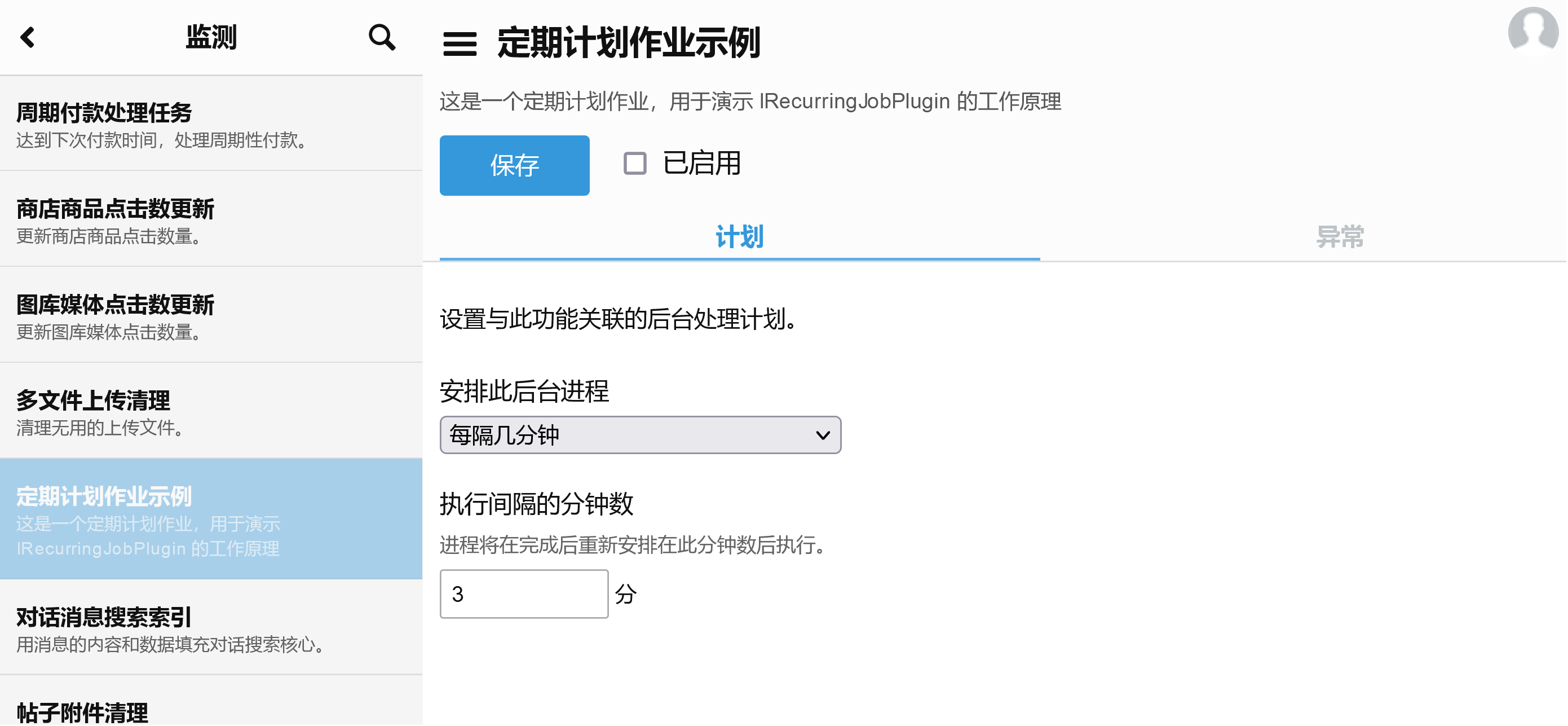
在这里,我们将默认计划设置为每三分钟运行一次。
public JobSchedule DefaultSchedule
{
    get { return JobSchedule.EveryMinutes(3); }
}
在此定期作业的完整示例中,作业每次运行时都会在事件日志中记录一个条目。
using System;
using Limyee.Common;
using Limyee.Extensibility.Api.Version1;
using Limyee.Extensibility.Jobs.Version1;

namespace Samples
{
    public class SamplemRecurringJob : IRecurringJobPlugin
    {
        public JobSchedule DefaultSchedule
        {
            get { return JobSchedule.EveryMinutes(3); }
        }

        public Guid JobTypeId
        {
            get { return new Guid("66BD7BB2-6BDB-492C-A806-D47EF68DFB40"); }
        }

        public JobContext SupportedContext
        {
            get { return JobContext.Service; }
        }

        public void Execute(JobData jobData)
        {
            var eventLog = Services.Get<IEventLog>();

            eventLog.Write(
                "SampleRecurringJob 已成功运行",
                new EventLogEntryWriteOptions
                {
                    Category = "Jobs",
                    EventType = "Information"
                });
        }

        public string Description
        {
            get { return "这是一个定期计划作业,用于演示 IRecurringJobPlugin 的工作原理"; }
        }

        public void Initialize()
        {
        }

        public string Name
        {
            get { return "定期计划作业示例"; }
        }
    }
}
将此示例部署到 Limyee 电商平台后,该插件将显示在“管理>监测>“作业”。 在“计划”选项卡上,您可以选择更改默认计划。